> ## Documentation Index
> Fetch the complete documentation index at: https://docs.revyl.com/llms.txt
> Use this file to discover all available pages before exploring further.
# Quickstart
> Get up and running with Revyl in 5 minutes
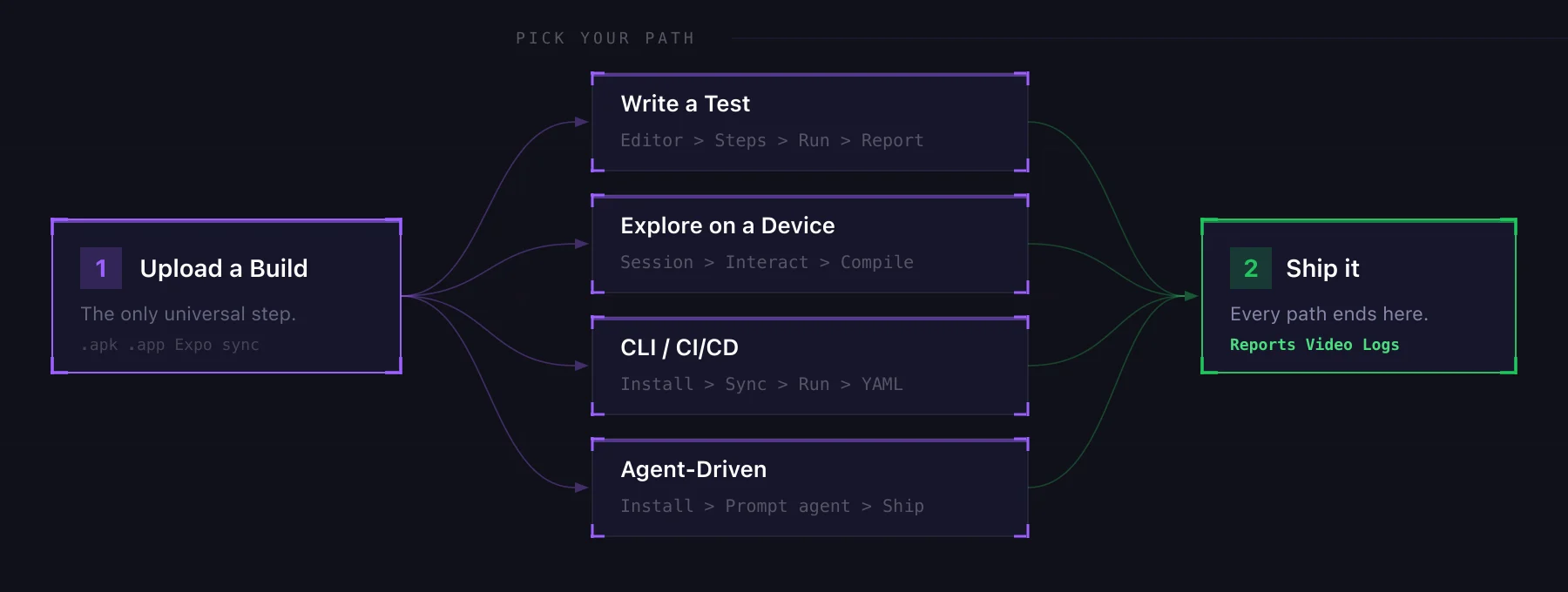 ## 1. Create an App
Head to **Apps** and click **Create app**. Give it a name, pick iOS or Android, and upload your first build.
* **Android**: `.apk` or `.zip` containing an `.apk`
* **iOS**: simulator `.app` bundle (from Xcode with `"simulator": true`)
Or [connect Expo](/builds/expo-sync) to auto-sync every EAS build.
See [Apps](/builds/index) for more, or the [framework guides](/builds/frameworks) for platform-specific build instructions.
## 2. Pick Your Path
What do you want to do next?
Great for QA engineers and anyone writing regression tests.
Go to **Tests**, click **Create test**, give it a name, and pick the app you just uploaded.
In the [test editor](/tests/creating-tests/test-editor), add natural-language steps:
* `Instruction`: "Tap the Sign In button"
* `Validation`: "The home screen is visible"
* `Extraction`: "Save the order number to \{\{order\_id}}"
Click **Run Steps**. The device boots and the AI agent executes each step against your app.
Every run produces a [report](/tests/reports): pass/fail, video replay, step-by-step results, device logs, network traces, and an AI-generated summary.
**Next:** learn about [step types](/appendix/step-types), [modules](/library/modules), and [workflows](/tests/workflows) to group tests together.
Great for developers and product folks who want a real device in their browser.
Go to **Sessions**, click **Start session**, and select your app. Your app boots on a real simulator streamed to your browser.
Tap, swipe, type, set GPS, open deep links. It's a real device, just remote.
When you're done, stop the session. Every session produces a [report](/tests/reports) with video replay, device logs, network traces, and performance metrics. Dig in to see exactly what happened.
Click **Convert to test** on the session row. Revyl's AI turns your interactions into structured test steps. See [Session to Test](/tests/creating-tests/recording).
**Next:** learn about [session sources](/develop/index) (UI, CLI, API) and [recording mode](/tests/creating-tests/recording) inside the test editor.
Great for automation engineers and anyone who wants tests in their pipeline.
```bash theme={null}
curl -fsSL https://revyl.com/install.sh | sh
```
Or use `brew`, `pipx`, `uv`, or `pip`. See [CLI install](/cli/index).
```bash theme={null}
revyl auth login
revyl init
```
Creates a `.revyl/` directory with your project config and test YAMLs.
```bash theme={null}
revyl tests sync # pull tests from Revyl to your repo
revyl tests run my-test # run a test from the terminal
```
Commit the YAML to git. CI can now run `revyl tests run` on every PR.
For iteration, `revyl dev` gives you hot reload against a live device. Edit the YAML, save, and it re-runs. See the [Dev Loop guide](/develop/dev-loop-overview).
**Next:** see [CI/CD integration](/guides/run-tests-ci-cd) and the full [command reference](/cli/configuration).
Great for developers who want their coding agent to handle the testing.
```bash theme={null}
curl -fsSL https://revyl.com/install.sh | sh
```
```bash theme={null}
revyl auth login
```
Open your project in Cursor, Claude Code, Codex, or any coding agent. Prompt it with something like:
```
Revyl is installed. My app is uploaded as "MyApp". Write a test
that covers the login flow, run it, and iterate until it passes.
```
The agent uses the CLI to start sessions, explore your app, write tests, run them, and debug failures.
**What agents can do with Revyl:**
* Bootstrap a new test suite from scratch
* Write tests for feature PRs
* Debug failing tests by reading reports and reproducing on a device
* Trigger regression suites after changes
Revyl also provides [MCP tools](/cli/mcp-setup) for device-backed app development.
**Next:** see the [CLI overview](/cli/index) for everything agents can do.
The mental model for Revyl
Install and use from the terminal
## 1. Create an App
Head to **Apps** and click **Create app**. Give it a name, pick iOS or Android, and upload your first build.
* **Android**: `.apk` or `.zip` containing an `.apk`
* **iOS**: simulator `.app` bundle (from Xcode with `"simulator": true`)
Or [connect Expo](/builds/expo-sync) to auto-sync every EAS build.
See [Apps](/builds/index) for more, or the [framework guides](/builds/frameworks) for platform-specific build instructions.
## 2. Pick Your Path
What do you want to do next?
Great for QA engineers and anyone writing regression tests.
Go to **Tests**, click **Create test**, give it a name, and pick the app you just uploaded.
In the [test editor](/tests/creating-tests/test-editor), add natural-language steps:
* `Instruction`: "Tap the Sign In button"
* `Validation`: "The home screen is visible"
* `Extraction`: "Save the order number to \{\{order\_id}}"
Click **Run Steps**. The device boots and the AI agent executes each step against your app.
Every run produces a [report](/tests/reports): pass/fail, video replay, step-by-step results, device logs, network traces, and an AI-generated summary.
**Next:** learn about [step types](/appendix/step-types), [modules](/library/modules), and [workflows](/tests/workflows) to group tests together.
Great for developers and product folks who want a real device in their browser.
Go to **Sessions**, click **Start session**, and select your app. Your app boots on a real simulator streamed to your browser.
Tap, swipe, type, set GPS, open deep links. It's a real device, just remote.
When you're done, stop the session. Every session produces a [report](/tests/reports) with video replay, device logs, network traces, and performance metrics. Dig in to see exactly what happened.
Click **Convert to test** on the session row. Revyl's AI turns your interactions into structured test steps. See [Session to Test](/tests/creating-tests/recording).
**Next:** learn about [session sources](/develop/index) (UI, CLI, API) and [recording mode](/tests/creating-tests/recording) inside the test editor.
Great for automation engineers and anyone who wants tests in their pipeline.
```bash theme={null}
curl -fsSL https://revyl.com/install.sh | sh
```
Or use `brew`, `pipx`, `uv`, or `pip`. See [CLI install](/cli/index).
```bash theme={null}
revyl auth login
revyl init
```
Creates a `.revyl/` directory with your project config and test YAMLs.
```bash theme={null}
revyl tests sync # pull tests from Revyl to your repo
revyl tests run my-test # run a test from the terminal
```
Commit the YAML to git. CI can now run `revyl tests run` on every PR.
For iteration, `revyl dev` gives you hot reload against a live device. Edit the YAML, save, and it re-runs. See the [Dev Loop guide](/develop/dev-loop-overview).
**Next:** see [CI/CD integration](/guides/run-tests-ci-cd) and the full [command reference](/cli/configuration).
Great for developers who want their coding agent to handle the testing.
```bash theme={null}
curl -fsSL https://revyl.com/install.sh | sh
```
```bash theme={null}
revyl auth login
```
Open your project in Cursor, Claude Code, Codex, or any coding agent. Prompt it with something like:
```
Revyl is installed. My app is uploaded as "MyApp". Write a test
that covers the login flow, run it, and iterate until it passes.
```
The agent uses the CLI to start sessions, explore your app, write tests, run them, and debug failures.
**What agents can do with Revyl:**
* Bootstrap a new test suite from scratch
* Write tests for feature PRs
* Debug failing tests by reading reports and reproducing on a device
* Trigger regression suites after changes
Revyl also provides [MCP tools](/cli/mcp-setup) for device-backed app development.
**Next:** see the [CLI overview](/cli/index) for everything agents can do.
The mental model for Revyl
Install and use from the terminal