> ## Documentation Index
> Fetch the complete documentation index at: https://docs.revyl.com/llms.txt
> Use this file to discover all available pages before exploring further.
# Set Up AWS PrivateLink
> Publish a private service as a VPC endpoint service and connect it to Revyl
**AWS PrivateLink is available on Enterprise plans.** Contact your Revyl
account team or [support@revyl.ai](mailto:support@revyl.ai) to enable it for
your organization before you start.
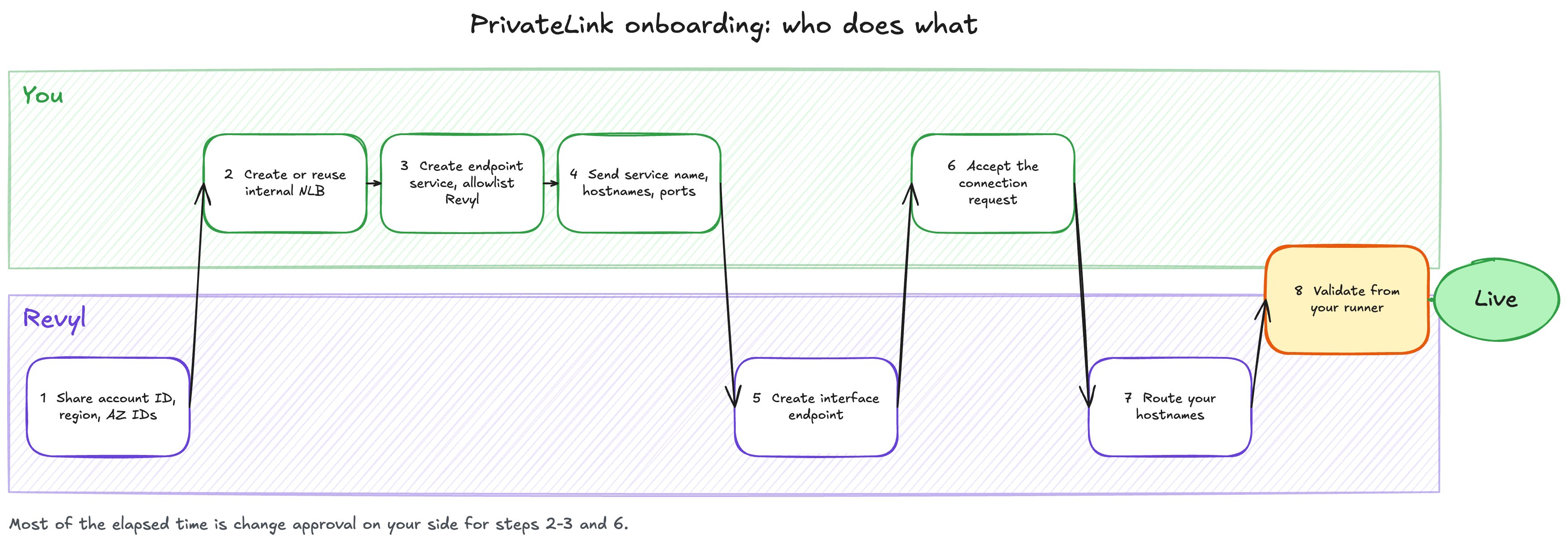
This guide walks through everything on your side of the connection. Revyl
handles the consumer side: the interface endpoint, DNS, and gateway routing.
 ## Before you start
You need:
* An AWS account and VPC that can reach the private service.
* Permission to create Network Load Balancers, target groups, and VPC endpoint
services (`elasticloadbalancing:*` and `ec2:*VpcEndpointService*`), or
someone on your infrastructure team who has it.
* The hostname and port of each service Revyl should reach, for example
`artifactory.internal.example.com:443`.
* PrivateLink enabled for your Revyl organization, which requires an
Enterprise plan. Reach out to your account team or
[support@revyl.ai](mailto:support@revyl.ai) to enable it.
You need these values in the steps below:
| Item | Value | Used for |
| - | - | - |
| Revyl AWS principal | `arn:aws:iam::992382537093:root` | Allowlisting on your endpoint service |
| Consumer region | `us-west-2` | Where Revyl's endpoint is created |
| AZ ID | `usw2-az2` | The zone your NLB must include (services in `us-west-2` only) |
**Already have an internal NLB in front of the service?** Reuse it. Check it
against the list below, fix anything that does not match, then go to step 3.
Otherwise, put each service behind a new internal NLB:
* **Scheme:** internal.
* **Subnets:** for a service in `us-west-2`, include a subnet in **`usw2-az2`**,
plus your usual zones. Match on AZ ID, not AZ name. In another region, use at
least two zones; no zone matching is needed. See
[Regions and Availability Zones](/guides/privatelink/overview#regions-and-availability-zones).
* **Cross-zone load balancing:** on. In `us-west-2`, Revyl enters only through
`usw2-az2`. With cross-zone off, only your `usw2-az2` targets serve Revyl,
and Revyl's traffic is blackholed whenever that zone has no healthy target.
See
[Cross-zone load balancing](/guides/privatelink/overview#cross-zone-load-balancing).
* **Listener:** TCP on the service port, usually `443`. A TCP listener passes
your service's TLS through untouched. A TLS listener with an ACM certificate
also works if you prefer to terminate TLS on the NLB.
* **Target group:** your instances, IPs, or an Application Load Balancer, with
a health check that reflects real service health. Fronting an ALB adds
its own zone behaviour; see
[Fronting an Application Load Balancer](/guides/privatelink/overview#fronting-an-application-load-balancer).
* **Security groups:** if your NLB has a security group, turn off **Enforce
inbound rules on PrivateLink traffic**. With it on, the security group sees
the private IP of Revyl's client, not an address in your VPC, so a rule that
allows only your VPC CIDR blocks Revyl. Connection acceptance and the
principal allowlist already limit who can connect. If your policy requires
enforcement, ask Revyl for its source range and allow the listener port from
it. Your targets' security groups must allow traffic from the NLB.
For a service in `us-west-2`, an NLB with no subnet in `usw2-az2`, or with no
healthy target there while cross-zone load balancing is off, is the most
common reason Revyl cannot reach your service.
Publish the NLB as an endpoint service and allow only Revyl's principal.
1. Open **VPC** -> **Endpoint services** -> **Create endpoint service**.
2. **Load balancer type:** Network. Select your new or existing NLB.
3. **Require acceptance for endpoint:** on.
4. **Supported Regions:** add `us-west-2` only if your service is in another
region.
5. **Private DNS name:** leave unset. Revyl maps your hostnames on its side.
6. Create the service, then open its **Allow principals** tab and add
`arn:aws:iam::992382537093:root`.
7. Copy the **Service name**. It looks like
`com.amazonaws.vpce.us-west-2.vpce-svc-0123456789abcdef0`.
```hcl theme={null}
variable "private_subnet_ids" {
description = "Private subnets, including one in usw2-az2"
type = list(string)
}
variable "vpc_id" {
type = string
}
resource "aws_lb" "revyl_privatelink" {
name = "revyl-privatelink"
internal = true
load_balancer_type = "network"
subnets = var.private_subnet_ids
enable_cross_zone_load_balancing = true
}
resource "aws_lb_target_group" "artifactory" {
name = "revyl-artifactory"
port = 443
protocol = "TCP"
target_type = "ip"
vpc_id = var.vpc_id
health_check {
protocol = "TCP"
}
}
resource "aws_lb_listener" "artifactory" {
load_balancer_arn = aws_lb.revyl_privatelink.arn
port = 443
protocol = "TCP"
default_action {
type = "forward"
target_group_arn = aws_lb_target_group.artifactory.arn
}
}
resource "aws_vpc_endpoint_service" "revyl" {
acceptance_required = true
network_load_balancer_arns = [aws_lb.revyl_privatelink.arn]
allowed_principals = ["arn:aws:iam::992382537093:root"]
tags = {
Name = "revyl-privatelink"
}
}
output "revyl_endpoint_service_name" {
value = aws_vpc_endpoint_service.revyl.service_name
}
```
If the service is outside `us-west-2`, also set
`supported_regions = ["us-west-2"]` on `aws_vpc_endpoint_service`.
Already have an NLB? Drop the `aws_lb`, `aws_lb_target_group`, and
`aws_lb_listener` resources and set `network_load_balancer_arns` to your
existing NLB's ARN.
Register targets with `aws_lb_target_group_attachment`, or point the target
group at your existing service the way the rest of your stack does.
```bash theme={null}
SERVICE_REGION="us-west-2"
NLB_ARN="arn:aws:elasticloadbalancing:${SERVICE_REGION}:111122223333:loadbalancer/net/revyl-privatelink/abc123"
REVYL_PRINCIPAL="arn:aws:iam::992382537093:root"
SERVICE_ID=$(aws ec2 create-vpc-endpoint-service-configuration \
--region "$SERVICE_REGION" \
--network-load-balancer-arns "$NLB_ARN" \
--acceptance-required \
--query "ServiceConfiguration.ServiceId" --output text)
aws ec2 modify-vpc-endpoint-service-permissions \
--region "$SERVICE_REGION" \
--service-id "$SERVICE_ID" \
--add-allowed-principals "$REVYL_PRINCIPAL"
aws ec2 describe-vpc-endpoint-service-configurations \
--region "$SERVICE_REGION" \
--service-ids "$SERVICE_ID" \
--query "ServiceConfigurations[0].ServiceName" --output text
```
Set `SERVICE_REGION` to the region that hosts your service. If it is not
`us-west-2`, also pass `--supported-regions us-west-2` to
`create-vpc-endpoint-service-configuration`.
Send the following to your Revyl contact. Nothing here is secret.
```text Onboarding details theme={null}
Revyl organization:
Endpoint service name: com.amazonaws.vpce.us-west-2.vpce-svc-0123456789abcdef0
Service home region: us-west-2
NLB AZ IDs: usw2-az1, usw2-az2
Hostnames and ports Revyl should route to this endpoint:
artifactory.internal.example.com 443 HTTPS
git.internal.example.com 22 SSH
Technical contact:
Change window, if any:
```
List every hostname your builds or app will use for these services, including
redirect targets and CDN-style download hosts. Revyl's gateway denies any
hostname that is not on your list.
Revyl creates the interface endpoint and tells you its endpoint ID. Accept the
pending request.
Open your endpoint service -> **Endpoint connections**. Confirm the
**Owner** is Revyl's account ID, `992382537093`, and the **Endpoint ID** matches the one Revyl
sent, then choose **Actions** -> **Accept endpoint connection request**.
```hcl theme={null}
resource "aws_vpc_endpoint_connection_accepter" "revyl" {
vpc_endpoint_service_id = aws_vpc_endpoint_service.revyl.id
vpc_endpoint_id = "vpce-0abc1234def567890"
}
```
```bash theme={null}
aws ec2 describe-vpc-endpoint-connections \
--region "$SERVICE_REGION" \
--filters Name=service-id,Values="$SERVICE_ID"
aws ec2 accept-vpc-endpoint-connections \
--region "$SERVICE_REGION" \
--service-id "$SERVICE_ID" \
--vpc-endpoint-ids vpce-0abc1234def567890
```
The connection state moves from **Pending acceptance** to **Available**
within a few minutes.
Revyl maps your hostnames to the endpoint and runs a connectivity check from
your Revyl capacity. Then run a real job: a build that pulls a private dependency, or a test that calls
your private API.
See [Verify and troubleshoot](/guides/privatelink/troubleshooting) for what to
check on your side.
## Adding more services later
* **Same NLB, new port:** add a listener and target group, then send Revyl the
new hostname and port. No new endpoint is needed.
* **New hostname on an existing port:** traffic lands on that port's existing
target group. Use this only when the backend already routes by hostname, for
example by HTTP `Host` header or TLS SNI. Otherwise give the service its own
port. Then send Revyl the hostname.
* **New NLB:** create a second endpoint service and repeat steps 3-5. Do not
attach it to the existing endpoint service: when an endpoint service has
several NLBs, AWS picks one per endpoint network interface, not per
hostname, so every NLB on a service must serve the same listeners and
backends.
This documentation is built and hosted on [Mintlify](https://mintlify.com), a developer documentation platform.
## Before you start
You need:
* An AWS account and VPC that can reach the private service.
* Permission to create Network Load Balancers, target groups, and VPC endpoint
services (`elasticloadbalancing:*` and `ec2:*VpcEndpointService*`), or
someone on your infrastructure team who has it.
* The hostname and port of each service Revyl should reach, for example
`artifactory.internal.example.com:443`.
* PrivateLink enabled for your Revyl organization, which requires an
Enterprise plan. Reach out to your account team or
[support@revyl.ai](mailto:support@revyl.ai) to enable it.
You need these values in the steps below:
| Item | Value | Used for |
| - | - | - |
| Revyl AWS principal | `arn:aws:iam::992382537093:root` | Allowlisting on your endpoint service |
| Consumer region | `us-west-2` | Where Revyl's endpoint is created |
| AZ ID | `usw2-az2` | The zone your NLB must include (services in `us-west-2` only) |
**Already have an internal NLB in front of the service?** Reuse it. Check it
against the list below, fix anything that does not match, then go to step 3.
Otherwise, put each service behind a new internal NLB:
* **Scheme:** internal.
* **Subnets:** for a service in `us-west-2`, include a subnet in **`usw2-az2`**,
plus your usual zones. Match on AZ ID, not AZ name. In another region, use at
least two zones; no zone matching is needed. See
[Regions and Availability Zones](/guides/privatelink/overview#regions-and-availability-zones).
* **Cross-zone load balancing:** on. In `us-west-2`, Revyl enters only through
`usw2-az2`. With cross-zone off, only your `usw2-az2` targets serve Revyl,
and Revyl's traffic is blackholed whenever that zone has no healthy target.
See
[Cross-zone load balancing](/guides/privatelink/overview#cross-zone-load-balancing).
* **Listener:** TCP on the service port, usually `443`. A TCP listener passes
your service's TLS through untouched. A TLS listener with an ACM certificate
also works if you prefer to terminate TLS on the NLB.
* **Target group:** your instances, IPs, or an Application Load Balancer, with
a health check that reflects real service health. Fronting an ALB adds
its own zone behaviour; see
[Fronting an Application Load Balancer](/guides/privatelink/overview#fronting-an-application-load-balancer).
* **Security groups:** if your NLB has a security group, turn off **Enforce
inbound rules on PrivateLink traffic**. With it on, the security group sees
the private IP of Revyl's client, not an address in your VPC, so a rule that
allows only your VPC CIDR blocks Revyl. Connection acceptance and the
principal allowlist already limit who can connect. If your policy requires
enforcement, ask Revyl for its source range and allow the listener port from
it. Your targets' security groups must allow traffic from the NLB.
For a service in `us-west-2`, an NLB with no subnet in `usw2-az2`, or with no
healthy target there while cross-zone load balancing is off, is the most
common reason Revyl cannot reach your service.
Publish the NLB as an endpoint service and allow only Revyl's principal.
1. Open **VPC** -> **Endpoint services** -> **Create endpoint service**.
2. **Load balancer type:** Network. Select your new or existing NLB.
3. **Require acceptance for endpoint:** on.
4. **Supported Regions:** add `us-west-2` only if your service is in another
region.
5. **Private DNS name:** leave unset. Revyl maps your hostnames on its side.
6. Create the service, then open its **Allow principals** tab and add
`arn:aws:iam::992382537093:root`.
7. Copy the **Service name**. It looks like
`com.amazonaws.vpce.us-west-2.vpce-svc-0123456789abcdef0`.
```hcl theme={null}
variable "private_subnet_ids" {
description = "Private subnets, including one in usw2-az2"
type = list(string)
}
variable "vpc_id" {
type = string
}
resource "aws_lb" "revyl_privatelink" {
name = "revyl-privatelink"
internal = true
load_balancer_type = "network"
subnets = var.private_subnet_ids
enable_cross_zone_load_balancing = true
}
resource "aws_lb_target_group" "artifactory" {
name = "revyl-artifactory"
port = 443
protocol = "TCP"
target_type = "ip"
vpc_id = var.vpc_id
health_check {
protocol = "TCP"
}
}
resource "aws_lb_listener" "artifactory" {
load_balancer_arn = aws_lb.revyl_privatelink.arn
port = 443
protocol = "TCP"
default_action {
type = "forward"
target_group_arn = aws_lb_target_group.artifactory.arn
}
}
resource "aws_vpc_endpoint_service" "revyl" {
acceptance_required = true
network_load_balancer_arns = [aws_lb.revyl_privatelink.arn]
allowed_principals = ["arn:aws:iam::992382537093:root"]
tags = {
Name = "revyl-privatelink"
}
}
output "revyl_endpoint_service_name" {
value = aws_vpc_endpoint_service.revyl.service_name
}
```
If the service is outside `us-west-2`, also set
`supported_regions = ["us-west-2"]` on `aws_vpc_endpoint_service`.
Already have an NLB? Drop the `aws_lb`, `aws_lb_target_group`, and
`aws_lb_listener` resources and set `network_load_balancer_arns` to your
existing NLB's ARN.
Register targets with `aws_lb_target_group_attachment`, or point the target
group at your existing service the way the rest of your stack does.
```bash theme={null}
SERVICE_REGION="us-west-2"
NLB_ARN="arn:aws:elasticloadbalancing:${SERVICE_REGION}:111122223333:loadbalancer/net/revyl-privatelink/abc123"
REVYL_PRINCIPAL="arn:aws:iam::992382537093:root"
SERVICE_ID=$(aws ec2 create-vpc-endpoint-service-configuration \
--region "$SERVICE_REGION" \
--network-load-balancer-arns "$NLB_ARN" \
--acceptance-required \
--query "ServiceConfiguration.ServiceId" --output text)
aws ec2 modify-vpc-endpoint-service-permissions \
--region "$SERVICE_REGION" \
--service-id "$SERVICE_ID" \
--add-allowed-principals "$REVYL_PRINCIPAL"
aws ec2 describe-vpc-endpoint-service-configurations \
--region "$SERVICE_REGION" \
--service-ids "$SERVICE_ID" \
--query "ServiceConfigurations[0].ServiceName" --output text
```
Set `SERVICE_REGION` to the region that hosts your service. If it is not
`us-west-2`, also pass `--supported-regions us-west-2` to
`create-vpc-endpoint-service-configuration`.
Send the following to your Revyl contact. Nothing here is secret.
```text Onboarding details theme={null}
Revyl organization:
Endpoint service name: com.amazonaws.vpce.us-west-2.vpce-svc-0123456789abcdef0
Service home region: us-west-2
NLB AZ IDs: usw2-az1, usw2-az2
Hostnames and ports Revyl should route to this endpoint:
artifactory.internal.example.com 443 HTTPS
git.internal.example.com 22 SSH
Technical contact:
Change window, if any:
```
List every hostname your builds or app will use for these services, including
redirect targets and CDN-style download hosts. Revyl's gateway denies any
hostname that is not on your list.
Revyl creates the interface endpoint and tells you its endpoint ID. Accept the
pending request.
Open your endpoint service -> **Endpoint connections**. Confirm the
**Owner** is Revyl's account ID, `992382537093`, and the **Endpoint ID** matches the one Revyl
sent, then choose **Actions** -> **Accept endpoint connection request**.
```hcl theme={null}
resource "aws_vpc_endpoint_connection_accepter" "revyl" {
vpc_endpoint_service_id = aws_vpc_endpoint_service.revyl.id
vpc_endpoint_id = "vpce-0abc1234def567890"
}
```
```bash theme={null}
aws ec2 describe-vpc-endpoint-connections \
--region "$SERVICE_REGION" \
--filters Name=service-id,Values="$SERVICE_ID"
aws ec2 accept-vpc-endpoint-connections \
--region "$SERVICE_REGION" \
--service-id "$SERVICE_ID" \
--vpc-endpoint-ids vpce-0abc1234def567890
```
The connection state moves from **Pending acceptance** to **Available**
within a few minutes.
Revyl maps your hostnames to the endpoint and runs a connectivity check from
your Revyl capacity. Then run a real job: a build that pulls a private dependency, or a test that calls
your private API.
See [Verify and troubleshoot](/guides/privatelink/troubleshooting) for what to
check on your side.
## Adding more services later
* **Same NLB, new port:** add a listener and target group, then send Revyl the
new hostname and port. No new endpoint is needed.
* **New hostname on an existing port:** traffic lands on that port's existing
target group. Use this only when the backend already routes by hostname, for
example by HTTP `Host` header or TLS SNI. Otherwise give the service its own
port. Then send Revyl the hostname.
* **New NLB:** create a second endpoint service and repeat steps 3-5. Do not
attach it to the existing endpoint service: when an endpoint service has
several NLBs, AWS picks one per endpoint network interface, not per
hostname, so every NLB on a service must serve the same listeners and
backends.
This documentation is built and hosted on [Mintlify](https://mintlify.com), a developer documentation platform.