> ## Documentation Index
> Fetch the complete documentation index at: https://docs.revyl.com/llms.txt
> Use this file to discover all available pages before exploring further.
# Workflows
> Group your tests and run them all at once
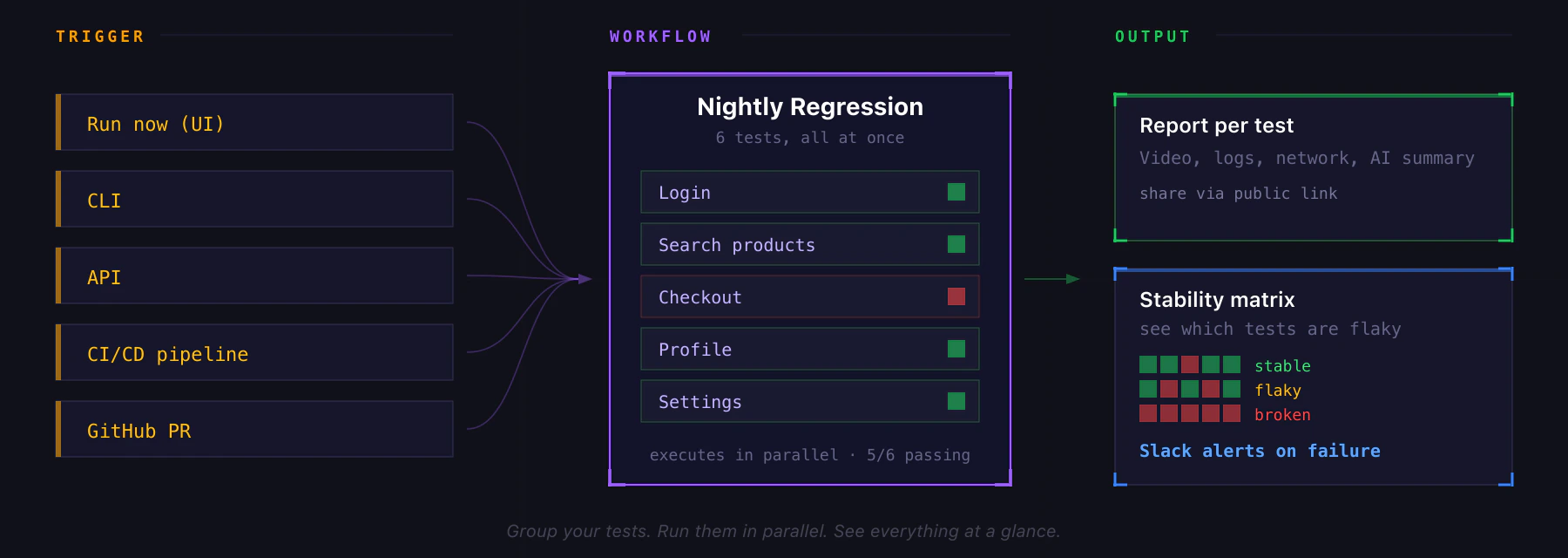
Workflows are named groups of tests that run in parallel as one unit: pick the tests, hit Run, and Revyl executes them all at once. Workflows can be used to run regression tests on Pull Requests, run nightly tests, or define smoke tests. You can trigger workflows manually, from CI/CD, or via API to gate deploys, and use built-in stability tracking to see which tests are reliable versus flaky over time.
 ## Creating a Workflow
1. Go to **Workflows** and click **Create Workflow**
2. Name it (e.g. `Nightly Regression`, `Smoke Suite`)
3. Pick the tests to include. Filter by platform or tags to find them quickly.
4. Save
## Running a Workflow
Trigger it any of these ways:
* **Run Now** button on the workflow card or detail page
* **CLI**: `revyl workflow run `
* **API**: `POST /api/v1/execute_workflow_id_async`
* **CI/CD**: from your pipeline, with `X-CI-*` headers to attribute the run
All selected tests start in parallel, up to your org's concurrency limit. Tests above the limit queue up automatically.
A workflow run completes only when every test finishes. The workflow is marked **passing** if every non-quarantined test passed, **failing** otherwise.
## Workflow Settings
From the workflow detail page, configure:
* **App override**: pin one iOS or Android app for every test in the workflow. Off by default, which means each test uses its own app.
* **Location override**: run every test with the same GPS coordinates.
* **Test timeout**: max duration for any single test in the workflow (1–180 min).
* **Failure policy per test**: mark individual tests as **quarantined** so their failures don't fail the workflow (useful for flaky tests you're still stabilizing).
* **Slack notifications**: route workflow results to a channel.
## Workflow Detail View
Four tabs:
* **Tests**: the tests in this workflow, with per-test quarantine toggle
* **History**: every execution, with pass/fail trend chart
* **Stability**: a matrix showing which tests are stable, flaky, or broken over recent runs
* **Settings**: the overrides above
Top-line metrics: total executions, successful runs, failed runs, and average pass rate, all with week-over-week deltas.
## Related
* [Reports](/tests/reports): every test in a workflow produces its own report
* [Slack integration](/integrations/slack): configure failure alerts
* [CLI](/cli/index): trigger workflows from your terminal or CI
## Creating a Workflow
1. Go to **Workflows** and click **Create Workflow**
2. Name it (e.g. `Nightly Regression`, `Smoke Suite`)
3. Pick the tests to include. Filter by platform or tags to find them quickly.
4. Save
## Running a Workflow
Trigger it any of these ways:
* **Run Now** button on the workflow card or detail page
* **CLI**: `revyl workflow run `
* **API**: `POST /api/v1/execute_workflow_id_async`
* **CI/CD**: from your pipeline, with `X-CI-*` headers to attribute the run
All selected tests start in parallel, up to your org's concurrency limit. Tests above the limit queue up automatically.
A workflow run completes only when every test finishes. The workflow is marked **passing** if every non-quarantined test passed, **failing** otherwise.
## Workflow Settings
From the workflow detail page, configure:
* **App override**: pin one iOS or Android app for every test in the workflow. Off by default, which means each test uses its own app.
* **Location override**: run every test with the same GPS coordinates.
* **Test timeout**: max duration for any single test in the workflow (1–180 min).
* **Failure policy per test**: mark individual tests as **quarantined** so their failures don't fail the workflow (useful for flaky tests you're still stabilizing).
* **Slack notifications**: route workflow results to a channel.
## Workflow Detail View
Four tabs:
* **Tests**: the tests in this workflow, with per-test quarantine toggle
* **History**: every execution, with pass/fail trend chart
* **Stability**: a matrix showing which tests are stable, flaky, or broken over recent runs
* **Settings**: the overrides above
Top-line metrics: total executions, successful runs, failed runs, and average pass rate, all with week-over-week deltas.
## Related
* [Reports](/tests/reports): every test in a workflow produces its own report
* [Slack integration](/integrations/slack): configure failure alerts
* [CLI](/cli/index): trigger workflows from your terminal or CI