

AWS PrivateLink is available on Enterprise plans. Contact your Revyl
account team or [email protected] to enable it for
your organization before you start.
When to use it
Private build dependencies
Remote builds pull packages from Artifactory, Nexus,
CodeArtifact, or an internal Git mirror that only resolves inside your VPC.
Private test backends
The app under test talks to a staging or pre-production API that is not
reachable from the internet.
No public allowlisting
Your security policy does not allow opening services to third-party IP
ranges, even with an IP allowlist.
Overlapping address space
PrivateLink does not route between VPCs, so overlapping CIDR ranges on
either side are not a problem.
How it works
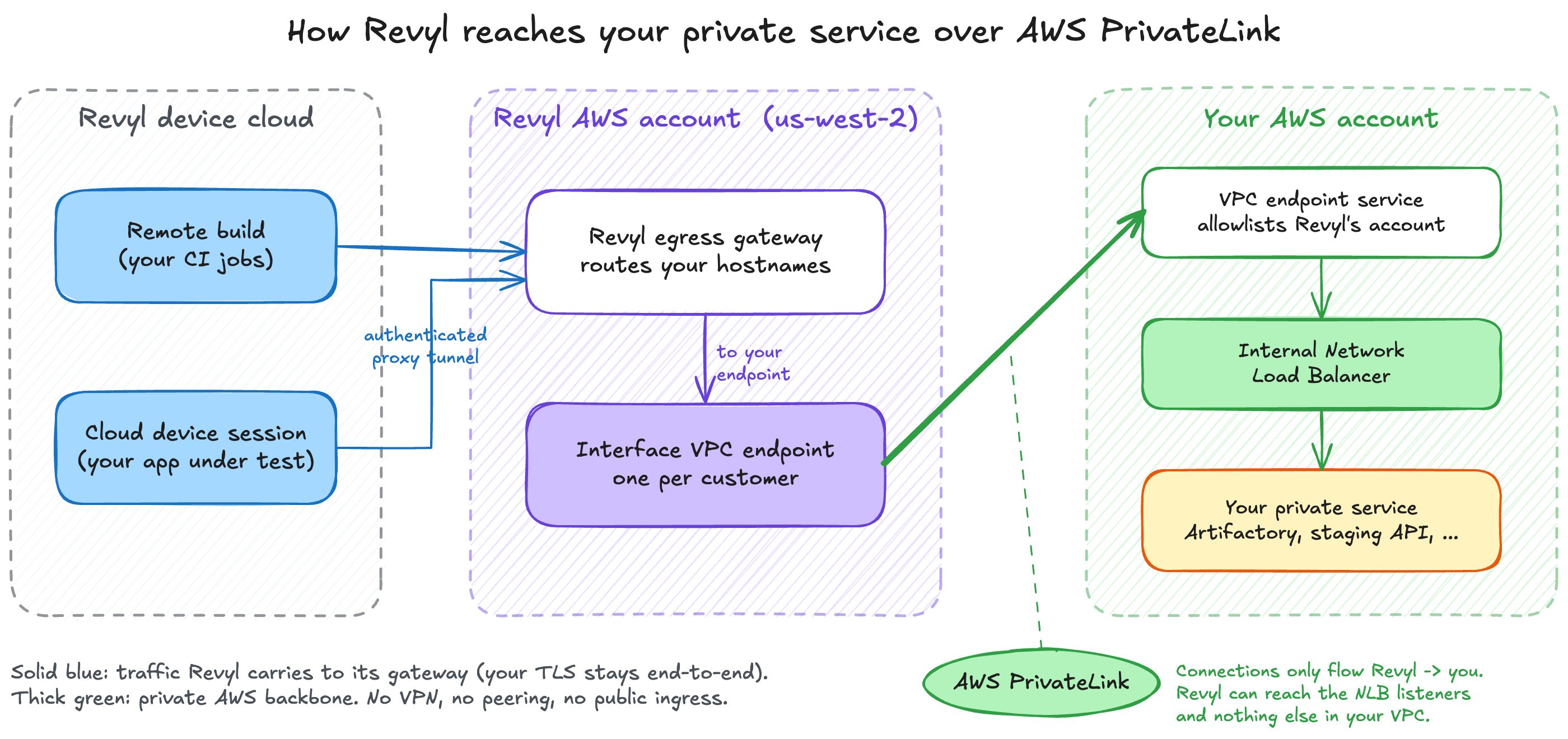
You are the service provider and Revyl is the service consumer, in AWS PrivateLink terms.- You put the service behind an internal Network Load Balancer (NLB) and publish it as a VPC endpoint service.
- You allow Revyl’s AWS account to connect to that endpoint service, and nothing else.
- Revyl creates an interface VPC endpoint for your service in Revyl’s AWS account. You approve the connection request.
- Revyl’s egress gateway routes traffic for your hostnames from your Revyl workloads to that endpoint.
Security model
What can Revyl reach in my network?
What can Revyl reach in my network?
Only the listeners you configure on the NLB behind your endpoint service.
PrivateLink does not create a route into your VPC. Security groups,
network ACLs, and route tables on the rest of your VPC are not involved.
Is traffic encrypted?
Is traffic encrypted?
Traffic between Revyl’s device hosts and Revyl’s AWS gateway travels over
an authenticated proxy tunnel, and the PrivateLink leg stays on the AWS
network. Revyl does not terminate your TLS: when your service serves TLS,
the session is encrypted end to end between the client on the Revyl
runner or device and your service. Serve TLS on every service you expose.
Can I see and revoke the connection?
Can I see and revoke the connection?
Yes. The connection appears under your endpoint service’s Endpoint
connections tab with Revyl’s account ID (
992382537093) and endpoint ID. Reject the
accepted connection at any time to cut access immediately. Removing
Revyl’s principal only blocks new endpoint connections; an endpoint you
already accepted keeps working until you reject it. See Offboarding.Who pays for what?
Who pays for what?
AWS bills the service provider for the NLB and the consumer for the
interface endpoint. Your NLB runs in your account; the interface endpoint
runs in Revyl’s account.
Regions and Availability Zones
Revyl’s PrivateLink consumer runs inus-west-2.
- Same region (recommended). Host your endpoint service in
us-west-2. - Another region. AWS supports cross-region PrivateLink. Add
us-west-2to your endpoint service’s supported Regions and tell Revyl the service’s home region. Expect inter-region data transfer charges and some added latency. Cross-region endpoints need no zone alignment, so keep your NLB in at least two zones of its own region and skip theusw2-az2requirements below.
usw2-az2.
Availability Zone names such as us-west-2a map to different physical
zones in each AWS account, so match on the AZ ID, not the name. For a
service in us-west-2, your NLB must have a subnet in usw2-az2; Revyl cannot
create its endpoint otherwise. Keep subnets in your other zones too, for your
own clients.
Cross-zone load balancing
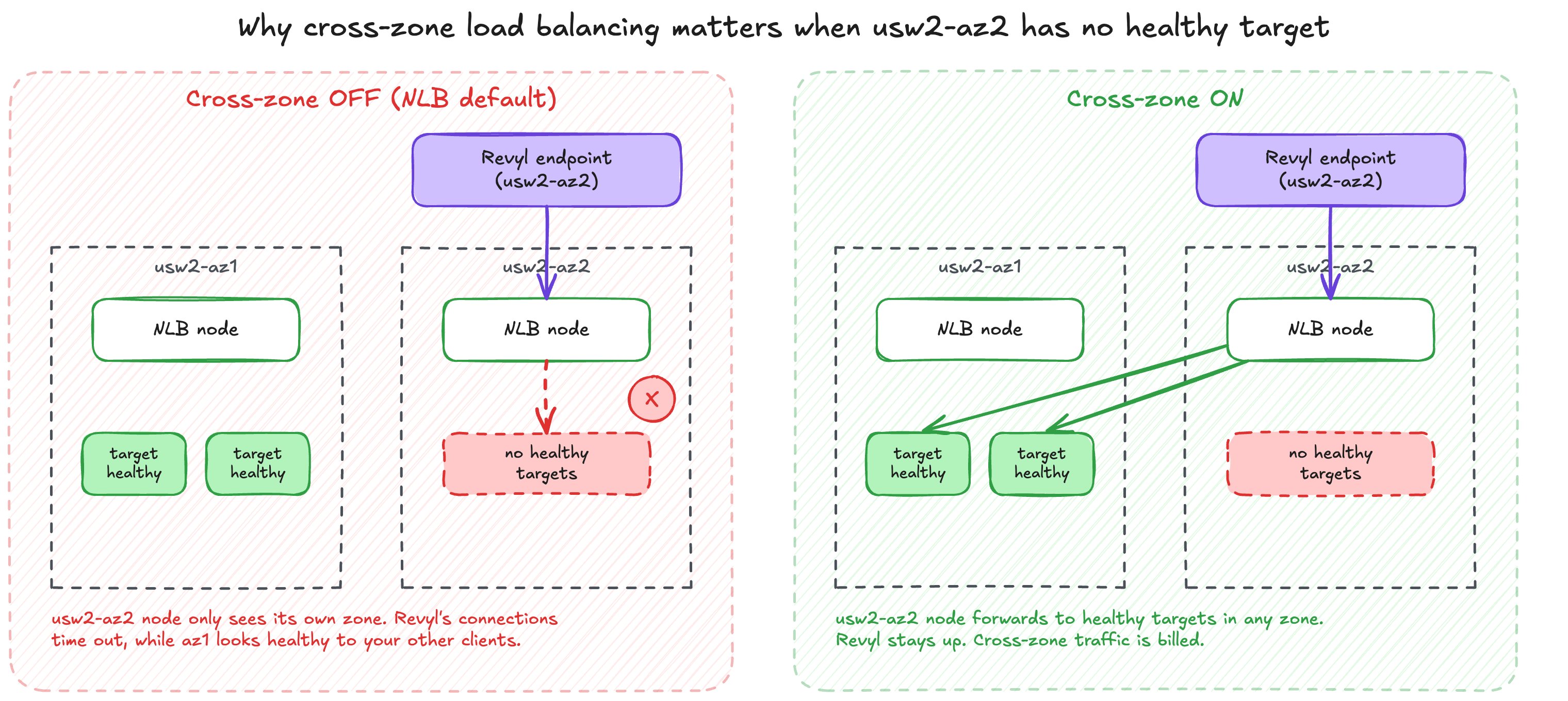
For a service inus-west-2, every Revyl connection enters your NLB through
its usw2-az2 node. AWS wires
an interface endpoint to the load balancer node in the same zone, so this
entry point does not move.
- Only your
usw2-az2targets serve Revyl. All Revyl load lands on them, however many healthy targets you run in other zones. - No healthy targets in
usw2-az2means a blackhole. Revyl’s connections time out while the service looks healthy to your other clients. - DNS failover does not help. When a zone has no healthy targets, the NLB
removes that zone’s IP from its own DNS name. Revyl’s endpoint never resolves
that name, so its traffic keeps arriving at the
usw2-az2node. The NLB only fails open to all zones once every zone is unhealthy.
usw2-az2 node spreads Revyl’s
connections across healthy targets in every enabled zone. A zone that empties
during a deploy or scale-in no longer takes Revyl down with it. AWS bills
regional data transfer for traffic that crosses zones.
Turn cross-zone load balancing on for the NLB or target group that serves
Revyl. If you need it off, keep enough healthy capacity in
usw2-az2 to carry
all of Revyl’s traffic on its own.Fronting an Application Load Balancer
You can register an existing ALB as the NLB’s target (analb target group).
It works, but there is a second load balancer in the path, and its zone
behaviour stacks on top of the NLB’s.
- The ALB must be enabled in
usw2-az2. AWS recommends keeping cross-zone load balancing off on an NLB that fronts an ALB, and you cannot change the attributes of analbtarget group. So theusw2-az2NLB node forwards only to the ALB’susw2-az2node. If the ALB has no node there, the result is the same blackhole as above. - ALB target groups with cross-zone off turn imbalance into errors. Each
ALB node then uses only its own zone’s targets. Every Revyl request hits your
usw2-az2targets: a few targets there run hot and slow, and an empty or fully unhealthyusw2-az2returns503for every Revyl request. - ALB cross-zone on (the default) trades errors for latency. Requests are balanced across all zones, but many cross a zone boundary after already passing through two load balancers.
- Results depend on where traffic enters. Your other clients arrive
through every zone, while Revyl arrives through one. A zone imbalance
among your targets can show up as slow responses or
503s for Revyl alone, while your dashboards look healthy. - The NLB balances connections, not requests. It picks a path once per TCP connection. Long-lived keep-alive or HTTP/2 connections stay on that path until they close, so adding targets or fixing a zone does not move traffic that is already flowing. Idle connections close after the NLB’s TCP idle timeout (350 seconds by default), and pooled clients see them as resets.
What is supported
Next steps
Set up PrivateLink
Step-by-step: NLB, endpoint service, and the details to send Revyl.
Verify and troubleshoot
Confirm traffic flows, fix common problems, and offboard cleanly.