

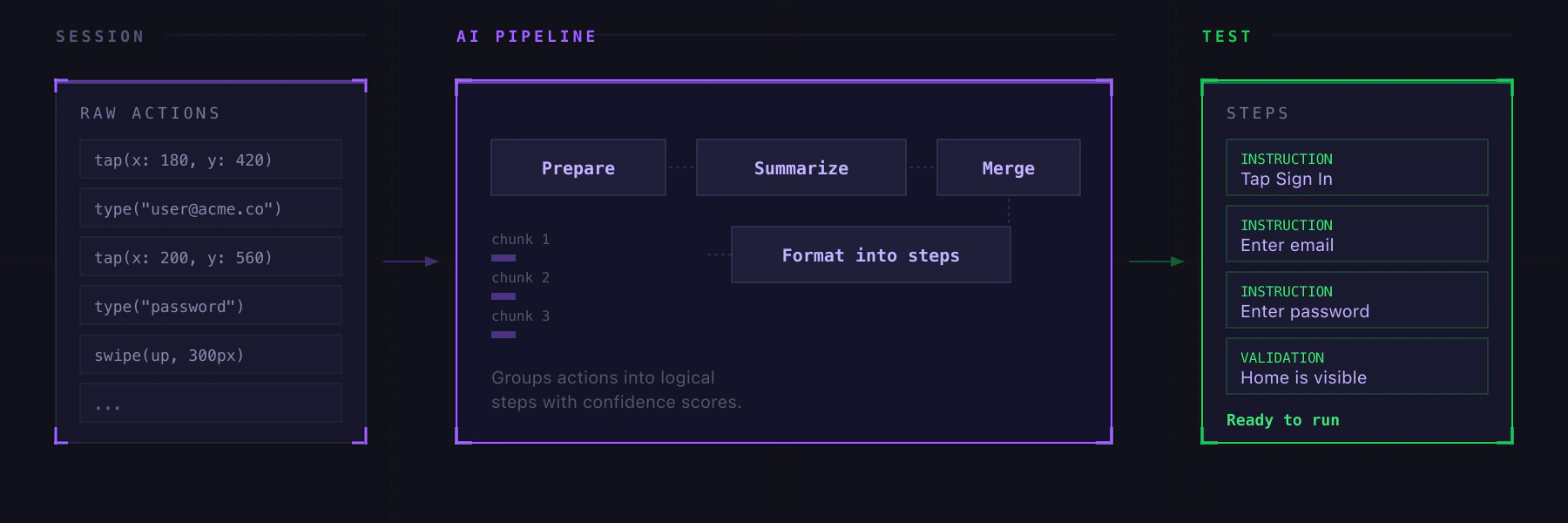
How It Works
- Start a session and interact with your app normally
- Stop the session (or let it idle-timeout)
- From the sessions history, click Convert to test on any session that has recorded actions
- Revyl’s AI analyzes your actions, groups them into logical steps, and generates natural-language instructions
- Review the generated steps in the editor. Edit, reorder, or delete anything that doesn’t look right.
- Click Create new test or Save as module
The Compile Pipeline
The compile runs through several stages:Queued > Preparing > Summarizing > Merging > Formatting > Complete
Each stage shows progress. If you close the modal while it’s running, a badge appears so you can come back to it.
Reviewing Results
The review panel shows each generated step with:- Step type (instruction, validation, manual) that you can toggle
- Description in plain English, editable inline
- Confidence score from the AI
- Retry with feedback if the results aren’t right (“focus on the login flow”, “ignore the settings detour”)
- Copy as YAML for use in CI/CD
- Save as module to reuse the steps across tests
Partial Compile
You don’t have to compile the entire session. Select a time range to compile just a portion, which is useful for long exploratory sessions where only part is relevant.When to Use This
- You’re exploring a new feature and want to turn that exploration into a regression test
- A QA team member found a bug manually and wants to create a reproducible test
- You want to bootstrap tests quickly without writing steps from scratch